Categories
Dry Ink

Covid 2020 Lockdown

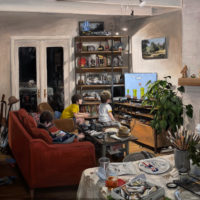
For our second round of covid stay at home orders the boys and I have been trying to use our time wisely. They have spent the last few weeks speed running Super Mario Bros, mastering Punch Out, and boldly adventuring in Zelda while I have been documenting their progress in oil.

This is my first large oil in a while (3ft x 4ft) and I’m much happier with it than previous attempts. All the practice in the field is slowly paying off I guess. This time it was much less a roll of the dice and I got the colors more or less where I wanted them. It helps that the lighting in the living room never changes and the kids don’t move much when glued to their screens.

Oil on Canvas. Mostly Rublev paints from NaturalPigments. Lead titanium white, vermillion, bone black… walnut oil. 4 main passes with scrape downs in-between. A few nights of work over the last month. From life, no photo reference.

oil Painting
3ft x 4ft oil on canvas
Categories
Dry Ink

Office philodendron

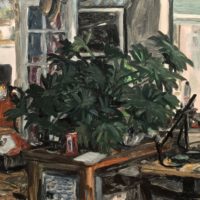
Here is a quick sketch of the house plant next to my desk. I’m testing out some new oil paints I ordered from Natural Pigments. They have a very different feel than my usual Holbein Aqua Oil colors. I’m digging them but they will take some time to get used to.

oil painting
9x12in Oil on panel
Categories
Dry Ink

Woman in a Hat Shop

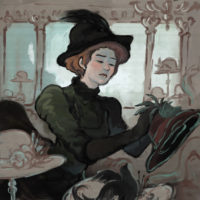
Went to the Legion of honor this weekend to check out the Degas, Impressionism, and the Paris Millinery Trade Show.  The show was great but then again I’m biased, I’m a sucker for impressionist paintings, hat and pretty girls and this show had all three. I was inspired to sit down and paint a little in ArtRage this morning, so here you go.

impressionist painting of a young woman millinery woman adding features to a hat
Put a bird on it

Categories
Ramblin' The Sheehy Boys

Bowler

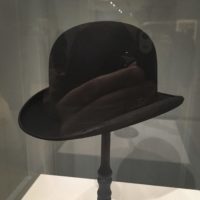
Finally found a good hat but it’s behind glass and there are three guards between it and the exit.

Went to the Degas show at the Legion of Honor this morning. Impressionist paintings and French millinery, this show was made just for me. Loved it. Sat down with the kids and drew ladies in hats for a few hours.


behind glass
want

Categories
Dry Ink

Opossum Blues

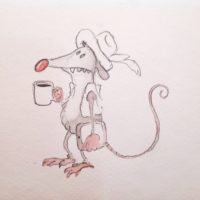
I was looking for blank paper in an old watercolor portfolio and found this little guy. I’m pretty sure he was for a pitch that never came together. Foggy memories about the plot are all that remain.

Coffee possum
Morning joe

Categories
Dry Ink

Signature cartoon

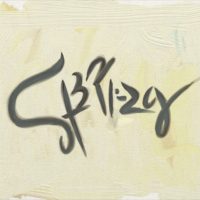
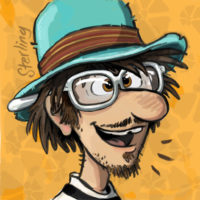
Here is a fun little optical illusion. I found that its possible to sign my name in such a way that it is also my self-portrait.

signature optical illusion reveals artist self portrait
It me in more ways than one.

Categories
Dry Ink

Wakefield: leaving home storyboards

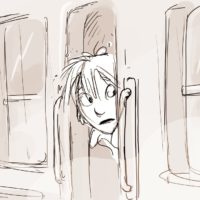
I’ve doodled quiet a bit on my Wakefield project these last few weeks. One of the bi-products has been this half-finished thought of a storyboard sequence. It has kindled a lot of conversation amongst my friends and family who are all very close to the story. I’ve learned that nothing is set in stone and sometimes the best thing for a stagnant project is to throw away convention. I’m curious to see where Wakefield will take me in the coming weeks.

Categories
Dry Ink

My goofy Mug

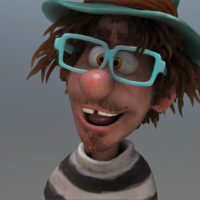
Here is the final render of my ZBrush Self Portrait sculpt. I created the sculpt entirely in ZBrush primarily using Dynamesh and Fibermesh techniques.

While making the model I stumbled upon the ZBrush retopology tools and spent a few nights learning how to implement them on my goofy mug. The retopolgy tools are a little clumsy but I found with time and effort that they were able to get the job done. Fibermesh can be a real memory drain so this new resource is a godsend for my little laptop. Now that I have a retopology option I am able to subdivide my models in a much more efficient way and increase the resolution I am able to work at significantly. I feel like a fool for not figuring out this function earlier.

me low poly
the model before retopology at its lowest subdivision level,

I love dynamesh, don’t get me wrong, but it can be difficult to work with on the back-end, especially after you have found your character.  The high polycounts cause lots of memory crashes which up your chances of lost work and make computational heavy actions like transposes nearly impossible. But the real killer and the reason I began researching retopology options is the lack of UV’s .  You create these beautiful characters but can’t do anything with them outside of ZBrush. The lack of UVs was a big problem for me on some of my previous sculpts especially when I was trying to render glass. At the time I wanted to render in MentalRay but couldn’t get any of my color information over to maya. Now I can do this easily so I couldn’t be happier.

My other big experiment this time around was using a morph target to sculpt the hair. My previous Fibermesh hair attempts all involved raw extrusions which I would sculpt using the move elastic brush to the desired styling. This time though I sculpted a guide model, ie morph target, and grew the hair to fill in the difference. This worked rather brilliantly and i’m pleased with the results. The one small catch is that my final hair has some unknown error which has block all attempts at exporting and transposing. I will have to rebuild it at some future date if I ever want to animate this fellow.

Topology

For those who are interested into this sort of thing. Here is the topology and a few hi-res renders.

http://www.youtube.com/watch?v=pkXioL_Gk5k&hd=1

Detail Renders

Categories
Dry Ink

ZBrush Self-Portrait

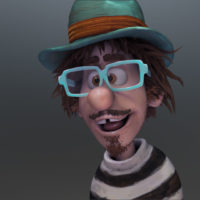
zbrush cartoon sculpt of Sterling Sheehy
Hey look its me!

I’m working on ZBrush self-Portrait at the moment. Nothing official just killing time while i’m up late watching the babies.

I just finished sculpting in the hair and thought I would share my render. I’m trying a different fibermesh technique this time for sculpting hair. I would like to get away from a real hair look so this time I’m using it to create large chunky sections that I dynamesh and add detail too. I’m going to build up a “hand painted” texture and see if I can get a nice 2.5d look going. Just playing around so no promises on where this will go.

Maybe I can use this thing to make some silly gif animations or something. That might be fun for the site.

Categories
Dry Ink

Programable Paintings

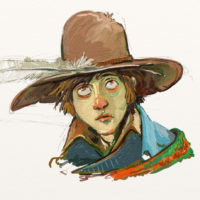
A feather in his hat
Original, full-res version.

ArtRage Studio Pro is the newest weapon in my digital painting arsenal and possibly the most powerful.   The selling point for me was a new function in version 3.5 that lets you record a painting as code that can be manipulated freely in post.  And yes that is as awesome as it sounds! For what was once the realm of flash and other vector based applications has now come to ArtRage and all of its messy paint stroke goodness.


The most obvious application for this technology is its ability to re-scale a painting after the fact. Not just resize an image but completely repaint a work at a higher resolution! In the world of digital painting this is BIG NEWS, no pun intended.

Years ago at USC I remember talking to my friend Jerome Pinzuti about this very idea. As both a painter and a programmer he proposed to me the possibility of recording every action that a digital painting program makes so that it could be played back, changed or manipulated at any point.  He made a strong point that a painting was just a string of commands and that it would be more practical to save them as functional code and not as useless compressed images.  The idea at the time was so simple. If you want to change the painting, then just change the code. This was a far off wild idea at the time but it is now a reality within ArtRage and I couldn’t be more excited.

Rebuilding a Painting

This functionality has so much potential. I downloaded the app late last night and immediately started painting a few tests.

One of the first benefits of this scriptable painting system is the ability to play back a painted work in time-lapse. What follows is not a screen grab of me painting but rather the script from the resulting painting running after the fact. I included this to demonstrate how the script rebuilds the painting. It is not a freeze of the image but rather a recording of the string of commands used to build it. For instant, time information and even stokes that I deleted are drawn and re-deleated within the recorded script.


File Enlargement Tests

Below is the resulting image of the same painting but run on a canvas which is 10,000px wide which is quite a bit larger than the original 1600px wide image.  This took the program about fifteen to twenty minutes to complete, but it was rather entertaining to watch the machine redraw the work.

Wakefield Head scriptedfull
The final scripted enlargement. Scaled down to a more reasonable 3000X1836px from 5000px

As a control I cropped the original image in Photoshop and enlarged the remaining slice to 1500px. As expected it is full of digital artifacts and pixelation. Everything that one would expect from an enlarged .jpeg file.

wakefield headphotoshop
Original image slice scaled up to 1500px. Notice the pixelation and digital artifacts.

Next is a slice from the image which was enlarged using an ArtRage script.  I cropped the resulting image to match but it is still at 100% resolution, measuring in at 1500px across.

Wakefield Headscripted
Scripted image scaling. No artifacts but the brush textures themselves stayed the same size and would need to be programed to match the new image scale.

Compared to the normal Photoshop enlargement it is remarkably clean especially for an image that was scalled so much.  I was rather impressed by this but disappointed to see that the texture of the original work had been lost.  It is obvious on closer inspection that the brush stroke textures themselves stayed at the same scale resulting in a much smother and flatter image.  The painting was enlarged but the size of the brushes painting it were not.  I imagine that this could be adjusted in the code or since the program is able to generate displacement maps be recalibrated through a filter.


reprogramming the painting

The next logical thing to do after this first scale test was to bust open the code and do some basic ArtRage script manipulation. My first order of business was to try and change the painting medium. I was expecting some difficulty in this task but it proved surprisingly easy . Digging through the script in textedit I was able to identify different brush types by their “toolID”.  That done all I had to do was change them to what ever medium I wished and hit render.

So to re-render a the painting in watercolour all i had to do was change “Value: { 4900 (Oil Paint) }” in the code to “Value: { 4916 (Watercolor) }”. As proof here are a few of the resulting images.

Wakefield Headwatercolour
A watercolour render

Wakefield Head pencil
A pencil render

Wakefield Head chalk
re-rendered in chalk

I am in love with the idea of painting in code and these initial findings are very promising.  Future exploration into the code and scripting language used to generate these paintings is a must! At the top of my list I would really like to learn how to manipulate and change textural elements to better match the enlarged images but I can’t help but think that there are far greater possibilities than this.

There is room here for some really interesting studies and experiments. In the study of visual literacy and cognitive sciences maybe this can be used as a tool to learn how people draw and translate thoughts into images. This code is a window into the mind of an artist and since every command is time stamped it can be used as a very accurate record of the creative process.

Can we define a masters style? Is there a code for abstract, impressionist or romantic? For instance can you deconstruct one persons drawing style or technique and mash it up with another? Can we take the speed, angle and pressure information of the brush and store it as some sort of filter that can be plugged into another script? Can line quality be tightened or loosened after the fact? Can I change the colour pallet to match another painting?

Could you program a robot to repaint the same image in real life?  
Can a digital painting be accurately recreated on canvas?  I mean seriously, could you actually print this out as an oil painting and hang it on a wall?  I say yes.  I don’t see why not.

The possibilities are endless and the future is bright.

If anyone else is interested in playing with ArtRage’s scripting code. I found this helpful guide online to get you started.