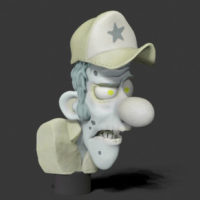
Apparently I forgot to post this Zbrush zombie sculpt. I made this fellow back around Halloween and has been sitting here in draft form for a few months. Its a tad out of season now but I guess late is better than never.
This was my first ZBrush 42Rb DynaMesh expirament. It was also my first use of the render filters function. Its a quick sculpt that dragged out into a few hours after I started playing around with the rendering features.
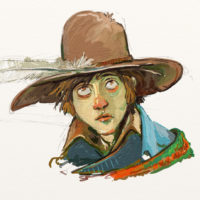
A hair render test of the The Mountain Bandit from my Dragon Project
This is my second hair sculpting attempt using ZBrush 42Rb and the new FirberMesh feature. I’m struggling a little to find a setting that will work well for my characters. Most of the hair ends up looking too realistic or too much like straw. I believe painting will be the solution but for now I think this is an OK start.
The subject here is “The Mountain Bandit”, the main villain from my forever shelved Dragon project. I have made several attempts in the past to sculpt him but his scraggly hair was beyond my skill level. It’s nice to be able to see him finally come together.
This is by no means final, I still have a bit of work to do. Tonight I will try to make a second pass. He has a great head-dress that I want to add as well as some other costume dressings. I also need to get him out of that dead looking neutral pose. Still its a decent start and I thought merited sharing.
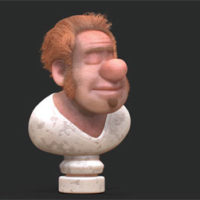
Last night I stayed up late to test out Zbrush 4R2b’s new FiberMesh additions. For testing purposes I made this quick DynaMesh sculpt and threw some hair on him. What you see here is my third grooming attempt. The first two hair passes were tragic failures that more or less resembled the bastard child of an ugly carpet and a putting green.
Creating the hair is effortless but controlling its flow is a bit tricky. There are a dozen grooming brushes and I have yet to master any of them. The workflow is very clear though so I don’t think it will take long to get up to speed. I don’t have experience in any other hair systems, so I am by no means an expert, but was generally very impressed with FiberMesh. It is a welcomed addition to my quiver of design tools.
This is a very old character of mine, I created him a life-time ago. I believe I was ten.
Recently, I have resurrected old characters like Don here to see what my adult self would do with them. In this case it was a zbrush sculpt. Start to finnish this project took me one night of work. The base mesh was made in Maya and then polished up and roughly painted in zbrush.
Don, Circa 1996
I found this animated gif of him, dated 1996, and put it up here for reference. At the time of this drawing he is already a few years old. There are boxes of better Don drawings sitting up in the attic that I really should scan.
Oh 1996, when animated gifs were all the rage and every website had to have one.Don maya sculpt
ArtRage Studio Pro is the newest weapon in my digital painting arsenal and possibly the most powerful. The selling point for me was a new function in version 3.5 that lets you record a painting as code that can be manipulated freely in post. And yes that is as awesome as it sounds! For what was once the realm of flash and other vector based applications has now come to ArtRage and all of its messy paint stroke goodness.
The most obvious application for this technology is its ability to re-scale a painting after the fact. Not just resize an image but completely repaint a work at a higher resolution! In the world of digital painting this is BIG NEWS, no pun intended.
Years ago at USC I remember talking to my friend Jerome Pinzuti about this very idea. As both a painter and a programmer he proposed to me the possibility of recording every action that a digital painting program makes so that it could be played back, changed or manipulated at any point. He made a strong point that a painting was just a string of commands and that it would be more practical to save them as functional code and not as useless compressed images. The idea at the time was so simple. If you want to change the painting, then just change the code. This was a far off wild idea at the time but it is now a reality within ArtRage and I couldn’t be more excited.
Rebuilding a Painting
This functionality has so much potential. I downloaded the app late last night and immediately started painting a few tests.
One of the first benefits of this scriptable painting system is the ability to play back a painted work in time-lapse. What follows is not a screen grab of me painting but rather the script from the resulting painting running after the fact. I included this to demonstrate how the script rebuilds the painting. It is not a freeze of the image but rather a recording of the string of commands used to build it. For instant, time information and even stokes that I deleted are drawn and re-deleated within the recorded script.
File Enlargement Tests
Below is the resulting image of the same painting but run on a canvas which is 10,000px wide which is quite a bit larger than the original 1600px wide image. This took the program about fifteen to twenty minutes to complete, but it was rather entertaining to watch the machine redraw the work.
The final scripted enlargement. Scaled down to a more reasonable 3000X1836px from 5000px
As a control I cropped the original image in Photoshop and enlarged the remaining slice to 1500px. As expected it is full of digital artifacts and pixelation. Everything that one would expect from an enlarged .jpeg file.
Original image slice scaled up to 1500px. Notice the pixelation and digital artifacts.
Next is a slice from the image which was enlarged using an ArtRage script. I cropped the resulting image to match but it is still at 100% resolution, measuring in at 1500px across.
Scripted image scaling. No artifacts but the brush textures themselves stayed the same size and would need to be programed to match the new image scale.
Compared to the normal Photoshop enlargement it is remarkably clean especially for an image that was scalled so much. I was rather impressed by this but disappointed to see that the texture of the original work had been lost. It is obvious on closer inspection that the brush stroke textures themselves stayed at the same scale resulting in a much smother and flatter image. The painting was enlarged but the size of the brushes painting it were not. I imagine that this could be adjusted in the code or since the program is able to generate displacement maps be recalibrated through a filter.
reprogramming the painting
The next logical thing to do after this first scale test was to bust open the code and do some basic ArtRage script manipulation. My first order of business was to try and change the painting medium. I was expecting some difficulty in this task but it proved surprisingly easy . Digging through the script in textedit I was able to identify different brush types by their “toolID”. That done all I had to do was change them to what ever medium I wished and hit render.
So to re-render a the painting in watercolour all i had to do was change “Value: { 4900 (Oil Paint) }” in the code to “Value: { 4916 (Watercolor) }”. As proof here are a few of the resulting images.
A watercolour renderA pencil renderre-rendered in chalk
I am in love with the idea of painting in code and these initial findings are very promising. Future exploration into the code and scripting language used to generate these paintings is a must! At the top of my list I would really like to learn how to manipulate and change textural elements to better match the enlarged images but I can’t help but think that there are far greater possibilities than this.
There is room here for some really interesting studies and experiments. In the study of visual literacy and cognitive sciences maybe this can be used as a tool to learn how people draw and translate thoughts into images. This code is a window into the mind of an artist and since every command is time stamped it can be used as a very accurate record of the creative process.
Can we define a masters style? Is there a code for abstract, impressionist or romantic? For instance can you deconstruct one persons drawing style or technique and mash it up with another? Can we take the speed, angle and pressure information of the brush and store it as some sort of filter that can be plugged into another script? Can line quality be tightened or loosened after the fact? Can I change the colour pallet to match another painting?
Could you program a robot to repaint the same image in real life? Can a digital painting be accurately recreated on canvas? I mean seriously, could you actually print this out as an oil painting and hang it on a wall? I say yes. I don’t see why not.
The possibilities are endless and the future is bright.
If anyone else is interested in playing with ArtRage’s scripting code. I found this helpful guide online to get you started.
After a few months in the story department I was pulled aside by the Directors of Space Chimps and told that they were impressed with my designs and I was asked if I would like to take them a few steps further. They offered me the character designer job which I excitedly excepted. I wasn’t going to pass up an opportunity to collaborate with our production designer, Dean Taylor! The man did Nightmare Before Christmas for petes sake!
From the beginning one of the big goals we set for ourselves was to create an alien world which was rich and diverse. The last thing we wanted to have was three or four creatures repeating though out the movie. I decided wasn’t just going to design creatures that were mentioned in the script. I was going to draw all the ambient ones as well. So to create a logic to the world I started from the ground up and created a Kingdom, Phylum, Class structure. I built rules and limitations and then built off of those. One of the big ideas was not to design specific creatures but to design elements and then mr. potatohead them together to build thousands of characters. (note: I was really impressed a few months ago when I saw theSpore creature creator which was essentially the same sort of thing I was thinking of.)
Once some of these basic elements were in place, everything just poured out.Everyone was really happy with the work and in no time I had a long list of approved characters. But the party wouldn’t last long.
Barry Sonnerfeld took over as creative producer and everything at the studio was turned on its head. In a character design meeting that I wasn’t invited to Berry cut everything Dean and I were working on. After everything was cut, I was told my “aliens were too appealing” and that “they upstaged the main charcters.”
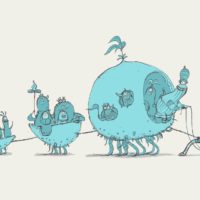
Here they are in all their overly appealing glory. let me know what you think.